Use Volume Snapshots to Create Development Environments with Real Data
Okteto Volume Snapshots allow you to initialize your development environments with data from a previously created snapshot. This is useful when working with large datasets or when you need to create Development Environments with realistic data from production or staging without having to manually copying databases or execute error-prone seed scripts.
Volume Snapshots are also useful for loading test data when running tests in Okteto Test. If your tests require a database with preloaded data, you can configure your test environment to restore from a snapshot instead of initializing an empty database. This ensures consistency across test runs and reduces setup time.
In this tutorial, you'll:
- ✅ deploy an application to Okteto
- ✅ learn how to create a volume snapshot of the application's database
- ✅ and then learn how to use it when creating a new Development Environment
Prerequisites
In order to follow this tutorial, you should have:
- A Kubernetes cluster with Okteto installed
- Familiarity with Kubernetes manifests
- kubectl installed on your machine
- At least one VolumeSnapshotClass defined on your cluster. If you are on Okteto BYOC, you already have this.
Step 1: Deploy the Sample Application
For this tutorial, we’ll deploy a CRUD recipe application that stores data in MongoDB.
Clone the repository:
$ git clone https://github.com/okteto/fastapi-snapshot-app
$ cd fastapi-snapshot-app
In the manifests folder, the k8s.yml manifest file is responsible for the deployment of the application's service, and the mongo.yml manifest file is responsible for deploying the database service. The database service in this case is a MongoDB service.
Deploy your development environment using the command below:
okteto deploy
Expected output:
...
Executing command 'Deploy Application'...
persistentvolumeclaim/data created
service/mongodb created
statefulset.apps/mongodb created
deployment.apps/fastapi-snapshot-demo created
service/fastapi-snapshot-demo created
Command 'Deploy Application' successfully executed
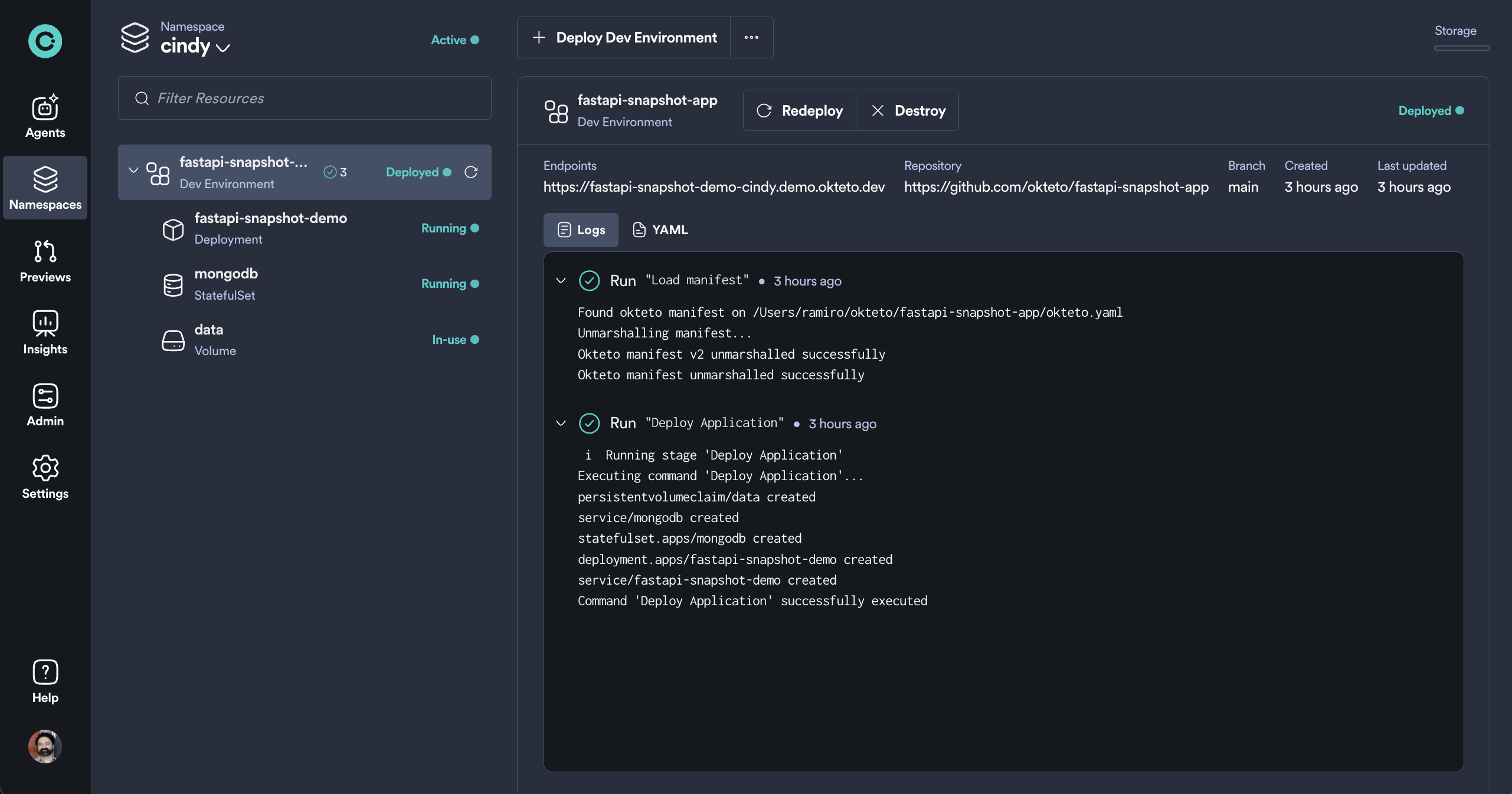
✅ Your application is now running in Okteto. Take note of the endpoint URL under Endpoints in the Okteto Dashboard.
Step 2: Populate the Application Database
Before taking a snapshot, add sample data. This is the data that we'll be including in the Development Environments that we'll create in the next steps).
curl -X 'POST' \
  'https://fastapi-snapshot-demo-cindy.okteto.example.com/recipe' \
  -H 'accept: application/json' \
  -H 'Content-Type: application/json' \
  -d '{
  "name": "Donuts",
  "ingredients": ["Flour", "Milk", "Sugar", "Vegetable Oil"]
}'
curl -X 'POST' \
  'https://fastapi-snapshot-demo-cindy.okteto.example.com/recipe' \
  -H 'accept: application/json' \
  -H 'Content-Type: application/json' \
  -d '{
  "name": "Pancake",
  "ingredients": ["Flour", "Milk", "Sugar", "Baking Powder", "Vegetable Oil"]
}'
Verify that the database has been populated by retrieving the list of recipes present:
 curl -X 'GET' \
  'https://fastapi-snapshot-demo-cindy.okteto.example.com/recipe' \
  -H 'accept: application/json'
Expected response:
{
  "data": [
    {
      "id": "60ce68651eeddf1c5ab796d1",
      "name": "Donuts",
      "ingredients": [
        "Flour",
        "Milk",
        "Sugar",
        "Vegetable Oil"
      ]
    },
    {
      "id": "60ce689c1eeddf1c5ab796d2",
      "name": "Pancake",
      "ingredients": [
        "Flour",
        "Milk",
        "Sugar",
        "Baking Powder",
        "Vegetable Oil"
      ]
    }
  ]
}
Step 3: Create a Database Snapshot
A Volume Snapshot will capture the database state at this moment.
Create a new manifest file snapshot.yml in the manifests folder and add the following to it:
apiVersion: snapshot.storage.k8s.io/v1
kind: VolumeSnapshot
metadata:
  name: mongo-snapshot
spec:
  volumeSnapshotClassName: okteto-snapshot-class
  source:
    persistentVolumeClaimName: data
In the Volume Snapshot Manifest above, you are creating a Volume Snapshot named mongo-snapshot, the snapshot will be created from the persistent volume data which was created when deploying the development environment.
Next, apply the Volume Snapshot from your terminal:
okteto kubeconfig
kubectl apply -f manifests/snapshot.yml
volumesnapshot.snapshot.storage.k8s.io/mongo-snapshot created
Finally, verify that the volume snapshot has been created successfully.
kubectl get volumesnapshot
NAME             READYTOUSE   SOURCEPVC   SOURCESNAPSHOTCONTENT   RESTORESIZE   SNAPSHOTCLASS           SNAPSHOTCONTENT                                    CREATIONTIME   AGE
mongo-snapshot   true         data                                1Gi           okteto-snapshot-class   snapcontent-1b8d8e7a-0b09-43c5-adeb-a08005ffbb4d   32s            34s
✅ Now we have a snapshot that can be used for new development environments!
Step 4: Deploy a Development Environment Using the Snapshot
1. Create a New Namespace for Development
okteto namespace create namespace-with-snapshot
2. Modify the Application Manifest to Use the Volume Snapshot
Create a new folder in the parent directory and copy k8s.yml and mongo.yml into it:
mkdir manifests-with-snapshot
cp manifests/{fastapi.yml,mongo.yml} manifests-with-snapshot
Update the PersistentVolumeClaim in the mongo.yml manifest to include the dev.okteto.com/from-snapshot-name and dev.okteto.com/from-snapshot-namespace annotations, as shown below, replacing $YOUR_SOURCE_NAMESPACE with the name of the Okteto namespace where you created the volume snapshot (e.g. cindy).
kind: PersistentVolumeClaim
apiVersion: v1
metadata:
  name: data
  annotations:
    dev.okteto.com/from-snapshot-name: mongo-snapshot
    dev.okteto.com/from-snapshot-namespace: $YOUR_SOURCE_NAMESPACE
spec:
  storageClassName: csi-okteto
  accessModes:
    - ReadWriteOnce
  resources:
    requests:
      storage: 1Gi
...
3. Deploy the New Development Environment Using the Newly Created Manifest
Duplicate your okteto.yml file:
cp okteto.yml okteto.with-snapshot.yml
And update it so that the deploy steps uses the new manifests:
build:
  fastapi:
    context: .

deploy:
    - name: Deploy Application
      command: |
        kubectl apply -f manifests-with-snapshot/mongo.yml
        envsubst < manifests-with-snapshot/fastapi.yml | kubectl apply -f -
Deploy the environment on the new namespace:
okteto deploy -n=namespace-with-snapshot -f okteto.with-snapshot.yml
Expected output:
...
Executing command 'Deploy Application'...
persistentvolumeclaim/data created
service/mongodb created
statefulset.apps/mongodb created
deployment.apps/fastapi-snapshot-demo created
service/fastapi-snapshot-demo created
Command 'Deploy Application' successfully executed
✅ Your new development environment is now running with real data! It can be accessed from the UI
Step 5: Verify the Data Clone
The final step is to retrieve the list of recipes from the newly deployed application. This is to verify that the development environment was created with the expected data.
Run the following command to check if the development database contains the same data as the original:
curl -X 'GET' \
  'https://fastapi-snapshot-demo-namespace-with-snapshot.example.okteto.com/recipe' \
  -H 'accept: application/json'
Expected response:
{
  "data": [
    {
      "id": "60ce68651eeddf1c5ab796d1",
      "name": "Donuts",
      "ingredients": ["Flour", "Milk", "Sugar", "Vegetable Oil"]
    },
    {
      "id": "60ce689c1eeddf1c5ab796d2",
      "name": "Pancake",
      "ingredients": ["Flour", "Milk", "Sugar", "Baking Powder", "Vegetable Oil"]
    }
  ]
}
✅ Success! The new environment has been created with a cloned database.
Conclusion
In this tutorial, you learned how to: ✔ Deploy an application with a database in Okteto ✔ Create a Volume Snapshot to capture its state ✔ Use the snapshot to spin up a new development environment with real data
By using Okteto Volume Snapshots, you can:
- Quickly replicate staging or production data for testing
- Eliminate the need for manual database migrations
- Speed up the development and debugging process
📖 Next Steps: Explore more on Okteto Volume Snapshots
The code used for this article can be found on GitHub.