Run Testcontainers tests with Okteto
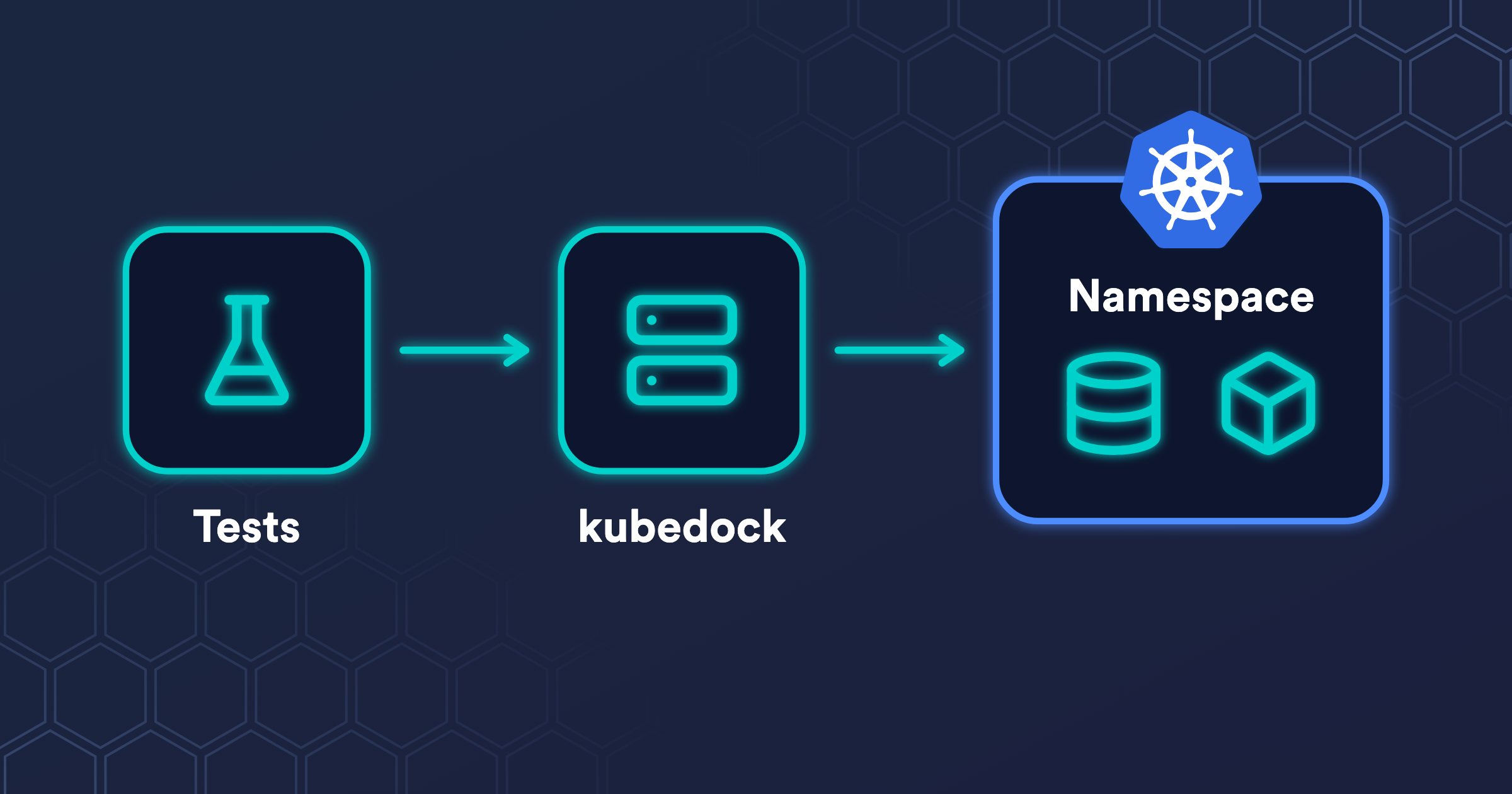
Testcontainers is a widely adopted library that runs the real dependencies of your tests, such as a Postgres database or a Kafka broker, as throwaway containers. It's available for Java, Go, .NET, Node.js, Python, and other languages. A test asks for a Postgres container, runs against a real database instead of a mock, and the container is removed when the test ends. To start those containers, Testcontainers needs the Docker API. On a laptop, that's Docker Desktop. On Kubernetes, it's Docker-in-Docker: a privileged container, which can run any kind of untrusted code with full access to its node. In a cluster shared by many developers, giving every test run that access is not an option. Luckily, an open source project, kubedock, comes to the rescue: it starts those containers as regular pods in your Okteto Namespace.
This tutorial runs the Testcontainers test suite of a sample application with okteto test and kubedock.
Prerequisites
Install the latest version of the Okteto CLI and configure it to access Okteto. Follow our installation guide if you haven't done it yet.
This tutorial doesn't support the BuildKit server of Okteto in rootless mode or with network.mode set to host.
kubedock
kubedock implements the Docker API, but it doesn't run containers itself: it translates each call into Kubernetes resources. Testcontainers talks to it as it would to a Docker daemon.
When a test asks for a Postgres container:
- kubedock creates a pod that runs the
postgresimage, and waits until it's running. - It makes the ports of the pod reachable to the test.
- When the test reads the logs of the container, runs a command in it, or copies a file to it, kubedock does the same on the pod.
- When the test stops the container, kubedock deletes the pod.
Vincent van Dam started kubedock in 2021 to run tests that need Docker containers without Docker-in-Docker, and still maintains it. It covers far more of the Docker API than a test suite usually needs, and it has the options that make it safe on a shared cluster, which this tutorial relies on. If it's useful to you too, give the repository a star.
Running the tests with Okteto Test
To see how to configure Okteto to run your tests with Testcontainers, this tutorial uses the testcontainers-kubedock sample: a small Scala web application, built with Maven, whose tests start a Postgres container. Get a local copy of it:
git clone https://github.com/okteto-community/testcontainers-kubedock
cd testcontainers-kubedock
Look at the test section of its Okteto Manifest:
test:
  unit:
    image: maven:3.9-eclipse-temurin-21
    caches:
      - /root/.m2
      - /root/.kubedock
    commands:
      - ./with-kubedock.sh mvn -B test
    artifacts:
      - target/test-reports
okteto test runs this command in a container in the cluster, with Remote Execution, and that container already has your Kubernetes credentials. with-kubedock.sh runs the tests with kubedock next to them:
- It downloads kubedock, starts it in the background on
tcp://127.0.0.1:2475, and waits until it answers. - It runs
mvn -B testwithDOCKER_HOSTset to that address, so Testcontainers talks to kubedock instead of a Docker daemon. It also setsTESTCONTAINERS_RYUK_DISABLED=trueto turn off Ryuk, the container that Testcontainers uses to clean up after a crashed run: Ryuk mounts the Docker socket, and--disable-dindturns off the Docker socket support of kubedock. - When the tests end, it stops kubedock, which deletes its pods and releases its lock on the Okteto Namespace.
This is how the script starts kubedock:
kubedock server \
  --kubeconfig "${KUBECONFIG:-$HOME/.kube/config}" \
  --namespace "$OKTETO_NAMESPACE" \
  --listen-addr 127.0.0.1:2475 \
  --port-forward \
  --disable-dind \
  --lock \
  --prune-start
| Flag | What it does |
|---|---|
--kubeconfig, --namespace | Create the pods in your Okteto Namespace, with the Kubernetes credentials of the test container. |
--listen-addr 127.0.0.1:2475 | Serve the Docker API only inside the test container. |
--port-forward | Make the ports of each pod reachable on 127.0.0.1. |
--disable-dind | Don't give the Docker socket to the containers that mount it. Without this flag, kubedock adds a sidecar with the socket to their pods. |
--lock | Lock the Okteto Namespace while kubedock runs. Another run in the same Okteto Namespace waits for the lock, for up to 15 minutes. |
--prune-start | Before starting, delete the pods and Services that other kubedock runs created in the Okteto Namespace. With --lock, they can only be the leftovers of a cancelled run. |
Now run the tests:
okteto test unit
kubedock starts, the tests get their Postgres container, and they pass:
 i  Executing test container 'unit'
 i  Running './with-kubedock.sh mvn -B test'
...
[ScalaTest-main-running-DiscoverySuite] INFO tc.postgres:15-alpine - Creating container for image: postgres:15-alpine
[ScalaTest-main-running-DiscoverySuite] INFO tc.postgres:15-alpine - Container postgres:15-alpine started in PT3.363441756S
[ScalaTest-main-running-DiscoverySuite] INFO tc.postgres:15-alpine - Container is started (JDBC URL: jdbc:postgresql://127.0.0.1:44173/test?loggerLevel=OFF)
- greeting is rendered
- postgres container answers a query
Run completed in 4 seconds, 400 milliseconds.
Total number of tests run: 2
Suites: completed 2, aborted 0
Tests: succeeded 2, failed 0, canceled 0, ignored 0, pending 0
All tests passed.
...
 ✓  Command './with-kubedock.sh mvn -B test' successfully executed
 ✓  Test container 'unit' passed
That's all. If you want to run Testcontainers with your own application in Okteto, copy with-kubedock.sh and the test section of the Okteto Manifest of the sample, and replace mvn -B test with the command that runs your tests.
Conclusion
Thanks to kubedock, you get the advantages of testing your application with Testcontainers, without running Docker-in-Docker in your Kubernetes cluster. Your tests run against the real dependencies of your application, such as a Postgres database, and each dependency is a regular pod in your Okteto Namespace that lives only while the tests need it. No privileged container is involved: kubedock starts with okteto test, creates the pods with your own Kubernetes credentials, and stops when the tests end.