Deploy a multi-repo application with dependencies
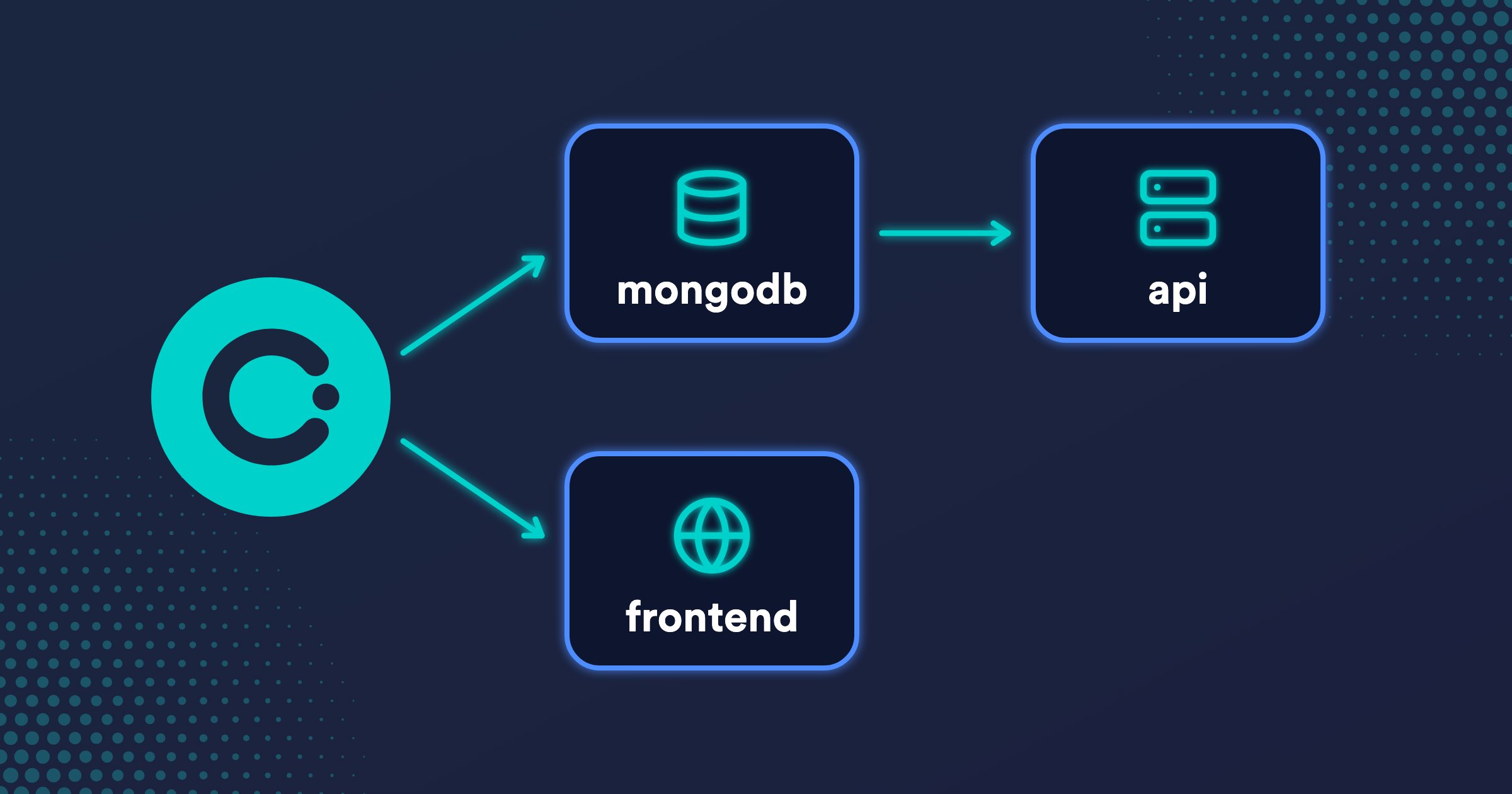
The dependencies section of the Okteto Manifest deploys other Git repositories as part of your Development Environment. Okteto deploys them in parallel, and depends_on tells it which ones must deploy first. This tutorial uses the Movies app, whose database, API, and frontend live in three repositories, and deploys the whole application with a single okteto deploy. To do the same with your own multi-repo application, we recommend using an AI agent with the Okteto agent skills.
Prerequisites
- Access to an Okteto instance, with your Okteto context configured.
- The Okteto CLI 3.25.0 or later installed on your machine.
- A local copy of the repository that deploys the application:
git clone https://github.com/okteto/movies-multi-repo
cd movies-multi-repo
You don't need copies of the other repositories: Okteto clones them in your cluster.
The Sample Application
The Movies app has a service in each of these repositories:
| Repository | Service | Deployed with |
|---|---|---|
okteto/mongodb | A MongoDB database | Docker Compose |
okteto/movies-api | A Node.js API that serves the movies under /api | A Helm chart |
okteto/movies-frontend | A React frontend | A Helm chart |
Each repository has its own Okteto Manifest that builds and deploys its service, so each team can work on its own repository without knowing how the others deploy. A fourth repository, okteto/movies-multi-repo, puts the application together: its Okteto Manifest lists the other three as dependencies, and its deploy section creates the one thing that belongs to the whole application: the Ingress that routes / to the frontend and /api to the API.
This is how Okteto works with multi-repo applications: one repository represents the application and lists the repositories of its services in dependencies, and a single okteto deploy from it deploys everything in a Namespace. To work on a service, you run okteto deploy from that service's repository, in the same Namespace, and optionally okteto up.
The Okteto Manifest
The okteto.yml file of movies-multi-repo deploys the three repositories and then exposes the application:
dependencies:
  mongodb:
    repository: https://github.com/okteto/mongodb
    variables:
      MONGODB_PASSWORD: movies
  movies-frontend:
    repository: https://github.com/okteto/movies-frontend
    wait: true
  movies-api:
    repository: https://github.com/okteto/movies-api
    depends_on: mongodb
    variables:
      MONGODB_URL: ${OKTETO_DEPENDENCY_MONGODB_VARIABLE_MONGODB_URL}
    wait: true

deploy:
  - name: Expose the Movies app
    command: kubectl apply -f k8s.yml
Each entry in dependencies is a repository that Okteto deploys as its own Development Environment, named after the entry. Okteto clones the default branch of repository in your cluster and runs okteto deploy with the Okteto Manifest it finds there. Use the branch and manifest fields to pick another branch or another path for the manifest.
The entries are named after their repositories on purpose. When you run okteto up from a clone of movies-api, Okteto looks for a Development Environment named after the repository, finds the one that movies-multi-repo deployed, and doesn't deploy it again.
Parallel Deployment and depends_on
Okteto deploys the dependencies in parallel. depends_on makes a dependency wait until the ones it lists have deployed successfully:
mongodbandmovies-frontenddon't depend on anything, so they start at the same time.movies-apihasdepends_on: mongodb. It starts oncemongodbhas deployed, because the API loads the sample movies into the database when it starts, and because it needs the connection string thatmongodbexports. It doesn't wait formovies-frontend.
Okteto validates the graph when it loads the manifest. A name in depends_on that isn't another entry in dependencies, a dependency that depends on itself, or a cycle makes the deploy fail before anything is deployed.
Settings with variables
variables sets environment variables for the Okteto Manifest of a dependency. mongodb gets the password for its database user in MONGODB_PASSWORD. Its own Okteto Manifest deploys MongoDB with Docker Compose and, before that, writes the connection string to $OKTETO_ENV:
deploy:
  commands:
    - name: Share the connection string
      command: echo "MONGODB_URL=mongodb://okteto:${MONGODB_PASSWORD:-password}@mongodb:27017/okteto" >> $OKTETO_ENV
  compose: docker-compose.yaml
Okteto keeps the variables that a dependency writes to $OKTETO_ENV, and exposes them to the other dependencies as OKTETO_DEPENDENCY_<NAME>_VARIABLE_<VARIABLE>: the MONGODB_URL that mongodb writes becomes OKTETO_DEPENDENCY_MONGODB_VARIABLE_MONGODB_URL. A dependency gets these dynamic environment variables only from the dependencies in its depends_on, which have finished deploying by the time it starts. That's how movies-api gets MONGODB_URL without hardcoding the password or the host of the database. Its Okteto Manifest passes the variable to its Helm chart, which stores it in a Secret:
deploy:
  - name: Deploy API
    command: helm upgrade --install movies-api chart --set image=${OKTETO_BUILD_API_IMAGE} --set mongodb.url=${MONGODB_URL}
To change the password, change MONGODB_PASSWORD in movies-multi-repo: both services get the new value on the next deploy.
Waiting for Dependencies
The commands of the deploy section start when the dependencies they need are ready. wait: true makes them wait until the dependency, and every dependency in its depends_on chain, is deployed and healthy:
- The Ingress routes traffic to
movies-frontendandmovies-api. Both havewait: true, so whenokteto deployfinishes, the endpoint already serves the whole application. mongodbdoesn't needwait: true: it's in thedepends_onchain ofmovies-api, so thedeploycommands wait for it too.
A dependency that has no wait and isn't in the depends_on chain of one that does deploys at the same time as the deploy commands. okteto deploy doesn't wait for it, and doesn't fail if it fails.
The deploy Section
The deploy section creates the Ingress defined in k8s.yml. It has the dev.okteto.com/generate-host annotation, so Okteto gives the application a public HTTPS endpoint in each Namespace:
apiVersion: networking.k8s.io/v1
kind: Ingress
metadata:
  name: movies
  annotations:
    dev.okteto.com/generate-host: "true"
spec:
  rules:
    - http:
        paths:
          - path: /
            pathType: Prefix
            backend:
              service:
                name: frontend
                port:
                  number: 80
          - path: /api
            pathType: Prefix
            backend:
              service:
                name: api
                port:
                  number: 8080
The command runs in your cluster with Remote Execution, so you don't need kubectl on your machine.
Deploying the Application
Deploy the application from the root of movies-multi-repo:
okteto deploy --wait
Okteto deploys the three repositories and then runs the command in the deploy section. Each line of a dependency starts with its name. This is the output, without the lines about cloning the repositories and starting the deploys:
 i  Using cindy @ okteto.example.com as context
 i  Deploying dependencies
[mongodb] Deploying repository 'mongodb'...
[movies-frontend] Deploying repository 'movies-frontend'...
[movies-frontend] INFO: Building '/okteto/src/Dockerfile'...
[mongodb]  i  Running stage 'Share the connection string'
[mongodb]  i  Running stage 'Deploying compose'
[mongodb]  ✓  Kubernetes service 'mongodb' created
[mongodb]  ✓  Volume 'data' created
[mongodb]  ✓  Service 'mongodb' created
[mongodb]  ✓  Compose 'mongodb' successfully deployed
[movies-frontend] SUCCESS: Image 'registry.okteto.example.com/cindy/movies-frontend-frontend-dev:okteto' successfully pushed
[movies-frontend] SUCCESS: Image 'registry.okteto.example.com/cindy/movies-frontend-frontend:okteto' successfully pushed
[mongodb]  ✓  Repository 'mongodb' successfully deployed
[movies-api] Deploying repository 'movies-api'...
[movies-frontend]  i  Running stage 'Deploy Frontend'
[movies-frontend] Release "movies-frontend" does not exist. Installing it now.
[movies-frontend]  ✓  Repository 'movies-frontend' successfully deployed
[movies-api] INFO: Building '/okteto/src/Dockerfile'...
[movies-api] SUCCESS: Image 'registry.okteto.example.com/cindy/movies-api-api-dev:okteto' successfully pushed
[movies-api] SUCCESS: Image 'registry.okteto.example.com/cindy/movies-api-api:okteto' successfully pushed
[movies-api]  i  Running stage 'Deploy API'
[movies-api] Release "movies-api" does not exist. Installing it now.
[movies-api]  ✓  Repository 'movies-api' successfully deployed
 i  Running stage 'Expose the Movies app'
ingress.networking.k8s.io/movies created
The output shows the order of the graph:
mongodbandmovies-frontendstart at the same time.movies-apistarts right afterRepository 'mongodb' successfully deployed, whilemovies-frontendis still deploying.- The
deploycommand starts oncemovies-apiandmovies-frontendhave deployed.
Each dependency is its own Development Environment in your Namespace: mongodb, movies-frontend, and movies-api, next to movies-multi-repo. To see the Movies app, open https://movies-cindy.okteto.example.com in your browser, with your own Namespace and the domain of your Okteto instance. Okteto lists each path of the Ingress under the Development Environment of the Service it routes to, so okteto endpoints --name movies-frontend prints the endpoint too.
Redeploying the Dependencies
Run okteto deploy again, and Okteto skips the dependencies that are already deployed:
 i  Deploying dependencies
[mongodb]  ✓  Skipping repository 'mongodb' because it's already deployed
[movies-frontend]  ✓  Skipping repository 'movies-frontend' because it's already deployed
[movies-api]  ✓  Skipping repository 'movies-api' because it's already deployed
This keeps your deploys fast while you work on movies-multi-repo. To deploy the latest code of every repository, for example after other teams merge their changes, add the --dependencies flag:
okteto deploy --wait --dependencies
Okteto deploys the three repositories again, in the same order: mongodb and movies-frontend in parallel, and movies-api after mongodb.
Developing on One of the Repositories
To change a service, work in its repository and deploy it to the same Namespace: the rest of the application keeps running from the deploy of movies-multi-repo. For example, clone the API's repository next to movies-multi-repo:
git clone https://github.com/okteto/movies-api
cd movies-api
The Continue watching for Cindy row of the Movies app shows the same movies as the Movies row, because the /api/watching route of server.js reads the movies collection. Change that route to read the watching collection, and deploy the API from that folder:
okteto deploy --wait
Okteto finds the movies-api Development Environment that movies-multi-repo deployed, builds a new image of the API, and upgrades its Helm release, which keeps its connection to MongoDB. Reload the Movies app: the Continue watching for Cindy row now shows other movies, such as Avengers: Infinity War. The frontend and the database didn't change: you only deployed the service you're working on. This is also the loop that an AI agent with the Okteto agent skills runs on every change.
If you also want hot reload and a debugger on every change, run okteto up from the same folder: Okteto replaces the api Deployment with the Development Container defined in the dev section of that repository. While okteto up is running, an AI agent with the Okteto agent skills skips the build and deploy cycle: your changes already reach the Development Container through File Sync, so the agent waits for you to tell it what to run next. Run okteto down when you're done. The Development Container guides explain how to configure a Development Container for each language.
The frontend works the same way: clone okteto/movies-frontend, change it, and run okteto deploy from its folder.
Cleaning Up
Destroy the application and its dependencies from the root of movies-multi-repo:
okteto destroy --dependencies --volumes
 i  Using cindy @ okteto.example.com as context
 ✓  Repository 'movies-api' scheduled for destruction
 ✓  Repository 'mongodb' scheduled for destruction
 ✓  Repository 'movies-frontend' scheduled for destruction
 ✓  Development environment 'movies-multi-repo' successfully destroyed
Okteto destroys movies-multi-repo and schedules the destruction of each dependency in your cluster. --volumes also deletes the MongoDB volume, with the sample movies. Without --dependencies, okteto destroy only removes what movies-multi-repo itself created, the Ingress, and keeps the Development Environments of the three dependencies.
FAQ
How do I configure the Okteto Manifest of each service?
Each repository builds, tests, and develops its own service. The Development Container guides explain the build, deploy, test, and dev sections for each language.
How do I make builds, deploys, and okteto up faster?
Upload only the files that each command needs: the context upload is key to performance. An AI agent with the Okteto agent skills configures what each command uploads for your application and measures how much faster your builds, deploys, and okteto up get. Optimize your Development Environments covers these and other optimizations.
Do I need to deploy every repository in every Namespace?
No. Divert lets you deploy only the services you change and reuse the services of a shared environment.
How do I start each environment with realistic data?
Create its database from a Volume Snapshot instead of loading the data on every deploy. Data from Volume Snapshots shows how.
How do I create resources outside Kubernetes, such as a cloud database?
Create them in the deploy and destroy commands with your infrastructure as code tool, so every environment gets its own cloud resources. Create cloud infrastructure with Terraform shows how, with an Amazon S3 bucket for each environment.
Where can I find every field of a dependency?
The dependencies reference describes every field of a dependency, such as branch, manifest, and timeout.