Configure access to your Azure account using Workload ID
Azure Cloud Credentials let the commands in your Okteto Manifests authenticate to Microsoft Azure with the identity of your Okteto cluster, without client secrets. They use Microsoft Entra workload identity federation: an App Registration in your Entra tenant trusts a short-lived token issued by your Kubernetes cluster, and the Azure roles you grant to that App Registration define what the commands can do.
This guide grants access to Azure Blob Storage in a resource group. You can grant access to other Azure resources by assigning the roles they require.
Injected Environment Variables
When Azure Cloud Credentials are enabled, Okteto adds these environment variables to the commands of okteto deploy, okteto destroy and okteto test:
| Variable | Value |
|---|---|
AZURE_TENANT_ID | The Directory (tenant) ID configured in the Admin Dashboard |
AZURE_CLIENT_ID | The Application (client) ID configured in the Admin Dashboard |
AZURE_AUTHORITY_HOST | The authority host configured in the Admin Dashboard, https://login.microsoftonline.com/ by default |
AZURE_FEDERATED_TOKEN_FILE | Path to a file with a Kubernetes service account token for the Okteto cluster identity, issued with the configured audience and valid for one hour |
These are the variables used by Azure Kubernetes Service workload identity, so the Azure SDKs (DefaultAzureCredential and WorkloadIdentityCredential) authenticate without extra configuration.
Unlike Okteto Cloud Credentials for AWS and Google Cloud, Okteto doesn't exchange the token for a cloud access token: Azure access tokens are scoped to a single resource, so each tool requests the token for the resource it needs.
Azure Cloud Credentials require Okteto CLI 3.25.0 or later. Earlier versions of the Okteto CLI receive AZURE_TENANT_ID, AZURE_CLIENT_ID and AZURE_AUTHORITY_HOST, but not AZURE_FEDERATED_TOKEN_FILE.
Every user who can run okteto deploy in your Okteto instance receives the federated token. Keep it limited to Azure:
- Use
api://AzureADTokenExchangeas the audience. The token belongs to the Okteto service account, which has admin access to your cluster, so Okteto refuses audiences accepted by your Kubernetes API server, such as the OIDC issuer URL of your cluster, orhttps://kubernetes.default.svcon distributions that list it as an API server audience. - Only add a federated credential for the Okteto service account to the App Registration you configure in Okteto. Any App Registration that trusts the same issuer, subject and audience can be accessed with the token.
Step 1: Get the OIDC configuration of your cluster
Azure validates the federated token against the OIDC issuer of your Kubernetes cluster, which must be reachable from the internet. Okteto shows the issuer and the subject of the Okteto service account under Integrations → General in the Admin Dashboard:
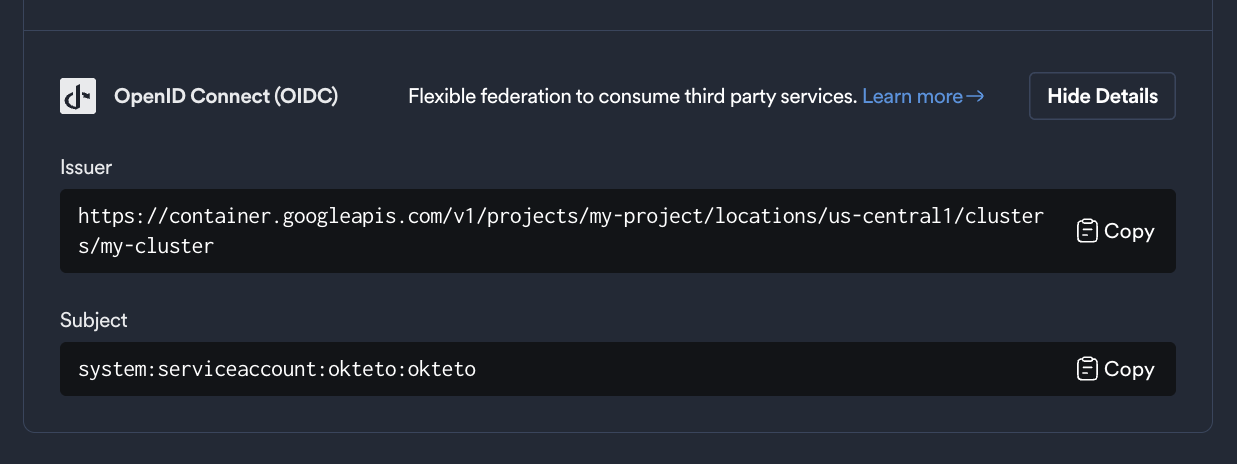
Store these values as environment variables for use in the next steps:
export OIDC_ISSUER=https://<your-cluster-oidc-issuer>
export OKTETO_SERVICE_ACCOUNT=system:serviceaccount:okteto:okteto
Step 2: Create the App Registration
We recommend installing the Azure CLI and running az login before following this guide.
The App Registration is the identity the commands in your Okteto Manifests act as. It doesn't need a client secret.
export APP_ID=$(az ad app create --display-name okteto-cloud-credentials --query appId -o tsv)
export APP_OBJECT_ID=$(az ad app show --id ${APP_ID} --query id -o tsv)
export TENANT_ID=$(az account show --query tenantId -o tsv)
Next, create the service principal of the App Registration. Azure role assignments target the service principal:
az ad sp create --id ${APP_ID}
APP_ID is the Application (client) ID you configure in Okteto. APP_OBJECT_ID is only used to manage the App Registration.
Step 3: Add the federated credential
The federated credential tells Entra ID to trust tokens issued by your cluster for the Okteto service account:
az ad app federated-credential create --id ${APP_OBJECT_ID} --parameters "{
  \"name\": \"okteto\",
  \"issuer\": \"${OIDC_ISSUER}\",
  \"subject\": \"${OKTETO_SERVICE_ACCOUNT}\",
  \"audiences\": [\"api://AzureADTokenExchange\"]
}"
Step 4: Assign Azure roles
Grant the service principal the roles it needs. For example, to create storage accounts and manage blobs in a resource group:
export RESOURCE_GROUP_ID=$(az group show --name my-resource-group --query id -o tsv)

az role assignment create --assignee ${APP_ID} --role "Storage Account Contributor" --scope ${RESOURCE_GROUP_ID}
az role assignment create --assignee ${APP_ID} --role "Storage Blob Data Contributor" --scope ${RESOURCE_GROUP_ID}
Role assignments can take a few minutes to take effect.
Step 5: Configure Azure Cloud Credentials in Okteto
There are two ways to configure Cloud Credentials in Okteto:
- Cloud Credentials in the Okteto Admin Dashboard - Follow the below steps to add credentials via the Admin Dashboard
- Cloud Credentials via a CRD - Follow this guide to add your cloud provider credentials via a CRD
If you add credentials using CRDs, they appear in the Dashboard, but you can't modify them from this view.
Adding Cloud Credentials Through the Admin Dashboard
Go to the Cloud Credentials view in the Okteto Admin Dashboard and enable the Azure Workload ID option.
Provide the following information:
- Tenant ID: The Directory (tenant) ID
TENANT_IDof your Entra tenant - Client ID: The Application (client) ID
APP_IDof the App Registration created in Step 2. Not the Object ID - Audience JWT Claim:
api://AzureADTokenExchange, the audience of the federated credential created in Step 3 - Authority Host: Only needed for sovereign clouds, such as
https://login.microsoftonline.us/for Azure Government. Leave it empty for the Azure public cloud
Azure CLI and Terraform
The Azure CLI doesn't read the injected variables by itself. Log in with the federated token before running other az commands:
az login --service-principal \
  --username "$AZURE_CLIENT_ID" \
  --tenant "$AZURE_TENANT_ID" \
  --federated-token "$(cat "$AZURE_FEDERATED_TOKEN_FILE")"
Add --allow-no-subscriptions if the App Registration has no role assigned on any subscription.
The Terraform AzureRM provider uses its own ARM_* environment variables. Map the injected variables before running Terraform:
export ARM_USE_OIDC=true
export ARM_TENANT_ID="$AZURE_TENANT_ID"
export ARM_CLIENT_ID="$AZURE_CLIENT_ID"
export ARM_OIDC_TOKEN_FILE_PATH="$AZURE_FEDERATED_TOKEN_FILE"
export ARM_SUBSCRIPTION_ID=<subscription-id>
Example Okteto Manifest
With the configuration complete, the following Okteto Manifest creates a blob container on deploy, uploads a file on test, and deletes the container on destroy:
deploy:
  image: mcr.microsoft.com/azure-cli:latest
  commands:
    - az login --service-principal -u "$AZURE_CLIENT_ID" -t "$AZURE_TENANT_ID" --federated-token "$(cat "$AZURE_FEDERATED_TOKEN_FILE")" -o none
    - az storage container create --account-name mystorageaccount -n okteto-demo --auth-mode login

test:
  azure:
    image: mcr.microsoft.com/azure-cli:latest
    commands:
      - az login --service-principal -u "$AZURE_CLIENT_ID" -t "$AZURE_TENANT_ID" --federated-token "$(cat "$AZURE_FEDERATED_TOKEN_FILE")" -o none
      - date > now.txt && az storage blob upload --account-name mystorageaccount -c okteto-demo -n "test-$(date +%s).txt" -f now.txt --auth-mode login

destroy:
  image: mcr.microsoft.com/azure-cli:latest
  commands:
    - az login --service-principal -u "$AZURE_CLIENT_ID" -t "$AZURE_TENANT_ID" --federated-token "$(cat "$AZURE_FEDERATED_TOKEN_FILE")" -o none
    - az storage container delete --account-name mystorageaccount -n okteto-demo --auth-mode login
--auth-mode login makes the storage commands use the federated identity instead of storage account keys.