Getting Started with Okteto and Java
Okteto runs your Java application in Kubernetes while you edit it on your machine: every time you save a file, the change runs in your cluster a few seconds later, and you can debug it with breakpoints from your IDE. The Java Sample App, a hello world HTTP server built with Spring Boot and available for Maven and for Gradle, is configured so that Okteto builds, deploys, and tests it directly in your Kubernetes cluster. To do the same in your own repository, we recommend using an AI agent with the Okteto agent skills.
Prerequisites
- The Okteto CLI, installed and configured to access your Okteto instance. See the installation guide.
- To debug the application: IntelliJ IDEA.
Clone the Java Sample App for the build tool that you use:
Maven
git clone https://github.com/okteto/java-maven-getting-started
cd java-maven-getting-started
Gradle
git clone https://github.com/okteto/java-gradle-getting-started
cd java-gradle-getting-started
The Dockerfile
The Dockerfile of the Java Sample App defines two images, one per stage:
Maven
FROM eclipse-temurin:25.0.5_8-jdk-resolute AS dev

RUN apt-get update && \
    apt-get install -y --no-install-recommends inotify-tools=4.25.9.0-1 && \
    rm -rf /var/lib/apt/lists/*

WORKDIR /usr/src/app
COPY mvnw pom.xml ./
COPY .mvn .mvn
RUN ./mvnw dependency:go-offline
COPY . .
RUN ./mvnw package -DskipTests

FROM eclipse-temurin:25.0.5_8-jre-resolute AS prod

COPY --from=dev /usr/src/app/target/helloworld-0.0.1.jar /usr/local/lib/hello-world.jar
CMD ["java", "-jar", "/usr/local/lib/hello-world.jar"]
Gradle
FROM eclipse-temurin:25.0.5_8-jdk-resolute AS dev

WORKDIR /usr/src/app
COPY gradlew settings.gradle build.gradle ./
COPY gradle gradle
RUN ./gradlew --no-daemon dependencies
COPY . .
RUN ./gradlew --no-daemon assemble

FROM eclipse-temurin:25.0.5_8-jre-resolute AS prod

COPY --from=dev /usr/src/app/build/libs/helloworld.jar /usr/local/lib/hello-world.jar
CMD ["java", "-jar", "/usr/local/lib/hello-world.jar"]
devis the development image. It contains the JDK, Maven or Gradle (downloaded by themvnworgradlewwrapper of the repository), the dependencies, including Spring Boot DevTools for hot reload, and the source code. The Maven image also containsinotifywait, from inotify-tools, to compile the code when a file changes. The JVM includes the Java Debug Wire Protocol (JDWP) agent for debugging. The last step compiles the application, so the first build in the Development Container finds the classes up to date.prodis the application image. It contains only the Java runtime and the JAR file built in thedevstage.
The dev stage follows the recommendations for development images: every version is pinned, and the stage that builds the application doubles as the development image. The wrapper pins the version of Maven or Gradle in .mvn/wrapper/maven-wrapper.properties or gradle/wrapper/gradle-wrapper.properties.
The Okteto Manifest
The okteto.yml file is the Okteto Manifest of the Java Sample App.
Build
The build section builds both images:
build:
  dev:
    context: .
    target: dev
  hello-world:
    context: .
    target: prod
    depends_on:
      - dev
target selects a stage of the Dockerfile. depends_on makes Okteto build the dev image first, so hello-world reuses its cached layers. Okteto pushes both images to the Okteto Registry and stores their references in the OKTETO_BUILD_DEV_IMAGE and OKTETO_BUILD_HELLO_WORLD_IMAGE variables.
Deploy
The deploy section installs the Helm chart in the chart folder, with the application image that Okteto built:
deploy:
  image: alpine/helm:4.3.2
  commands:
    - helm upgrade --install hello-world chart --set image=${OKTETO_BUILD_HELLO_WORLD_IMAGE}
The command runs with Remote Execution, in a container inside your cluster that uses the image set in deploy.image, so you don't need Helm on your machine.
Deploying the Java Sample App
Run okteto deploy from the root folder of the Java Sample App:
okteto deploy
Okteto builds the dev and hello-world images, runs the deploy command, and prints the endpoint of the application. This is the output of the Maven version (the images and the Development Environment of the Gradle version are named java-gradle-getting-started):
 i  Using cindy @ okteto.example.com as context
 ✓  Image 'registry.okteto.example.com/cindy/java-maven-getting-started-dev:okteto' successfully pushed
 ✓  Image 'registry.okteto.example.com/cindy/java-maven-getting-started-hello-world:okteto' successfully pushed
 i  Running stage 'helm upgrade --install hello-world chart --set image=${OKTETO_BUILD_HELLO_WORLD_IMAGE}'
Executing command 'helm upgrade --install hello-world chart --set image=${OKTETO_BUILD_HELLO_WORLD_IMAGE}'...
Release "hello-world" does not exist. Installing it now.
NAME: hello-world
NAMESPACE: cindy
STATUS: deployed
REVISION: 1
 i  Endpoints available:
  - https://hello-world-cindy.okteto.example.com
 ✓  Development environment 'java-maven-getting-started' successfully deployed
Open the endpoint in your browser to see the Hello world! response. The Okteto UI shows the same endpoint:

Okteto creates an HTTPS endpoint for the Ingress in the Helm chart.
Testing the Java Sample App
The test section of the Okteto Manifest defines a Test Container that runs the unit tests in src/test/java/com/okteto/helloworld/RestHelloWorldTest.java. The test sends a request to the controller with Spring's MockMvc and checks the Hello world! response.
Maven
test:
  unit:
    image: ${OKTETO_BUILD_DEV_IMAGE}
    caches:
      - /root/.m2/repository
    commands:
      - ./mvnw test
    artifacts:
      - target/surefire-reports
Gradle
test:
  unit:
    image: ${OKTETO_BUILD_DEV_IMAGE}
    caches:
      - /root/.gradle/caches
    commands:
      - ./gradlew test
    artifacts:
      - build/reports/tests/test
image: the development image, so the tests run with the same JDK and build tool as the Development Container.caches: the Maven repository (/root/.m2/repository) or the Gradle caches (/root/.gradle/caches), kept between runs of the Test Container.commands: the commands that run the tests. The Test Container fails if any of them exits with a non-zero code.artifacts: the files that Okteto copies to your machine when the tests finish, in this case the test reports.
Test Containers run with Remote Execution, in a container inside your cluster.
Run the unit tests from the root folder of the Java Sample App:
okteto test
Maven
 i  Using cindy @ okteto.example.com as context
 i  Images were already built. To rebuild your images run 'okteto build'
 i  Executing test container 'unit'
 i  Running './mvnw test'
[INFO] -------------------------------------------------------
[INFO]  T E S T S
[INFO] -------------------------------------------------------
[INFO] Running com.okteto.helloworld.RestHelloWorldTest
[INFO] Tests run: 1, Failures: 0, Errors: 0, Skipped: 0, Time elapsed: 1.912 s -- in com.okteto.helloworld.RestHelloWorldTest
[INFO]
[INFO] Results:
[INFO]
[INFO] Tests run: 1, Failures: 0, Errors: 0, Skipped: 0
[INFO]
[INFO] BUILD SUCCESS
 ✓  Command './mvnw test' successfully executed
 ✓  Test container 'unit' passed
The test reports are now in the target/surefire-reports folder of the Java Sample App on your machine.
Gradle
 i  Using cindy @ okteto.example.com as context
 i  Images were already built. To rebuild your images run 'okteto build'
 i  Executing test container 'unit'
 i  Running './gradlew test'
> Task :compileJava
> Task :processResources
> Task :classes
> Task :compileTestJava
> Task :processTestResources NO-SOURCE
> Task :testClasses
> Task :test
RestHelloWorldTest > sayHello() PASSED
BUILD SUCCESSFUL in 12s
 ✓  Command './gradlew test' successfully executed
 ✓  Test container 'unit' passed
The test report is now in the build/reports/tests/test folder of the Java Sample App on your machine. Open build/reports/tests/test/index.html in your browser to see it.
Running okteto deploy and okteto test after each change is usually fast enough, especially when an AI agent writes and tests the code autonomously. With the Okteto agent skills, the agent runs this loop in its own Namespace and reports back the tests it ran, the endpoints of the application, and a link to that Namespace.
Developing in a Development Container
If you use AI agents, the Development Container is optional: agents work well with the okteto deploy and okteto test cycle, and don't need one. A Development Container gives you the experience of developing on your machine, with hot reload and a debugger on every change. When you run okteto up, Okteto replaces the hello-world Deployment with the Development Container, keeps your local files synchronized with it, and runs the hot-reload and debugging tools of the development image in your cluster.
While okteto up is running, an AI agent with the Okteto agent skills skips the build and deploy cycle: your changes already reach the Development Container through File Sync, so the agent waits for you to tell it what to run next.
Configuration
The dev section of the okteto.yml file defines the Development Container of the Java Sample App:
Maven
dev:
  hello-world:
    image: ${OKTETO_BUILD_DEV_IMAGE}
    command: sh -c "./mvnw spring-boot:run & while inotifywait -qq -r -e close_write,moved_to,delete src; do ./mvnw -q compile; done"
    sync:
      - .:/usr/src/app
    persistentVolume:
      enabled: false
    forward:
      - 5005:5005
Gradle
dev:
  hello-world:
    image: ${OKTETO_BUILD_DEV_IMAGE}
    command: sh -c "./gradlew --console=plain --continuous classes & ./gradlew --console=plain bootRun"
    sync:
      - .:/usr/src/app
    persistentVolume:
      enabled: false
    forward:
      - 5005:5005
The hello-world key matches the name of the Deployment in the Helm chart. These are the fields of the Development Container:
image: the development image built in thebuildsection.command: starts the application and compiles the code every time a.javafile changes. Spring Boot DevTools restarts the application when the compiled classes change.- Maven:
./mvnw spring-boot:runstarts the application, andinotifywaitwaits for a change in thesrcfolder to run./mvnw -q compile. Maven doesn't have a watch mode. - Gradle:
./gradlew --continuous classescompiles the code every time a file changes, and./gradlew bootRunstarts the application.
- Maven:
sync: synchronizes the root folder of the Java Sample App with/usr/src/app, the working directory of the development image.persistentVolume: disables the persistent volume of the Development Container. Okteto synchronizes the files again on everyokteto up, and the dependencies come from the development image, so there's no volume to create and attach. In projects with many dependencies, enable it and add/root/.m2or/root/.gradleto volumes to keep the caches of Maven or Gradle betweenokteto upsessions.forward: forwards port5005, where the JVM debug agent listens, to your machine.
Hot reload
Run okteto up to replace the hello-world Deployment with the Development Container:
okteto up
Okteto synchronizes your files and runs the command of the Development Container, which starts the application. This is the output of the Maven version:
 i  Using cindy @ okteto.example.com as context
 i  'java-maven-getting-started' was already deployed. To redeploy run 'okteto deploy' or 'okteto up --deploy'
 ✓  Images successfully pulled
 ✓  Files synchronized
    Context:   okteto.example.com
    Namespace: cindy
    Name:      hello-world
    Forward:   5005 -> 5005

[INFO] --- compiler:3.15.0:compile (default-compile) @ helloworld ---
[INFO] Nothing to compile - all classes are up to date.
[INFO] --- spring-boot:4.1.2:run (default-cli) @ helloworld ---
Listening for transport dt_socket at address: 5005
 :: Spring Boot ::                (v4.1.2)
2026-11-19T04:25:37.640Z  INFO 232 --- [  restartedMain] o.s.boot.tomcat.TomcatWebServer          : Tomcat started on port 8080 (http) with context path '/'
2026-11-19T04:25:37.645Z  INFO 232 --- [  restartedMain] com.okteto.helloworld.Application        : Started Application in 2.013 seconds (process running for 2.396)
Open src/main/java/com/okteto/helloworld/RestHelloWorld.java in your IDE, change the response message on line 11 to Hello world from Okteto!, and save the file:
@GetMapping("/")
public String sayHello() {
	return "Hello world from Okteto!";
}
Okteto synchronizes the file to the Development Container. Maven or Gradle compiles it, and Spring Boot DevTools restarts the application:
Maven
2026-11-19T04:25:54.439Z  INFO 232 --- [   File Watcher] rtingClassPathChangeChangedEventListener : Restarting due to 2 class path changes (0 additions, 0 deletions, 2 modifications)
 :: Spring Boot ::                (v4.1.2)
2026-11-19T04:25:54.801Z  INFO 232 --- [  restartedMain] com.okteto.helloworld.Application        : Started Application in 0.318 seconds (process running for 19.552)
Gradle
Change detected, executing build...
> Task :compileJava
> Task :processResources UP-TO-DATE
> Task :classes
BUILD SUCCESSFUL in 1s
Waiting for changes to input files...
2026-11-19T04:29:59.937Z  INFO 253 --- [   File Watcher] rtingClassPathChangeChangedEventListener : Restarting due to 1 class path change (0 additions, 0 deletions, 1 modification)
 :: Spring Boot ::                (v4.1.2)
2026-11-19T04:30:00.359Z  INFO 253 --- [  restartedMain] com.okteto.helloworld.Application        : Started Application in 0.37 seconds (process running for 33.869)
Reload the endpoint in your browser to see the new message. The change runs in your cluster without building an image or redeploying the application.
Press Ctrl+C to stop the application and exit okteto up.
Debugging with IntelliJ IDEA
The JVM in the Development Container runs with the Java Debug Wire Protocol (JDWP) agent, which listens on port 5005. The build file of the Java Sample App adds the agent to the JVM that runs the application:
Maven
<plugin>
	<groupId>org.springframework.boot</groupId>
	<artifactId>spring-boot-maven-plugin</artifactId>
	<configuration>
		<jvmArguments>-agentlib:jdwp=transport=dt_socket,server=y,suspend=n,address=*:5005</jvmArguments>
	</configuration>
</plugin>
Gradle
bootRun {
    jvmArgs = ["-agentlib:jdwp=transport=dt_socket,server=y,suspend=n,address=*:5005"]
}
suspend=n starts the application without waiting for a debugger. The agent only runs in the Development Container: the application image starts the JAR file with java -jar, without it.
Spring Boot DevTools restarts the application inside the same JVM, so the debugger stays attached while you change the code, and you debug with the same okteto up command that gives you hot reload. With okteto up running, create the debug configuration in IntelliJ IDEA:
- From the main menu, select Run > Edit Configurations.
- Click + and select Remote JVM Debug.
- Enter a name in the Name field, for example
Debug On Okteto. - Set Debugger mode to
Attach to remote JVM, Host tolocalhost, and Port to5005, the port thatokteto upforwards to your machine. - Click OK.
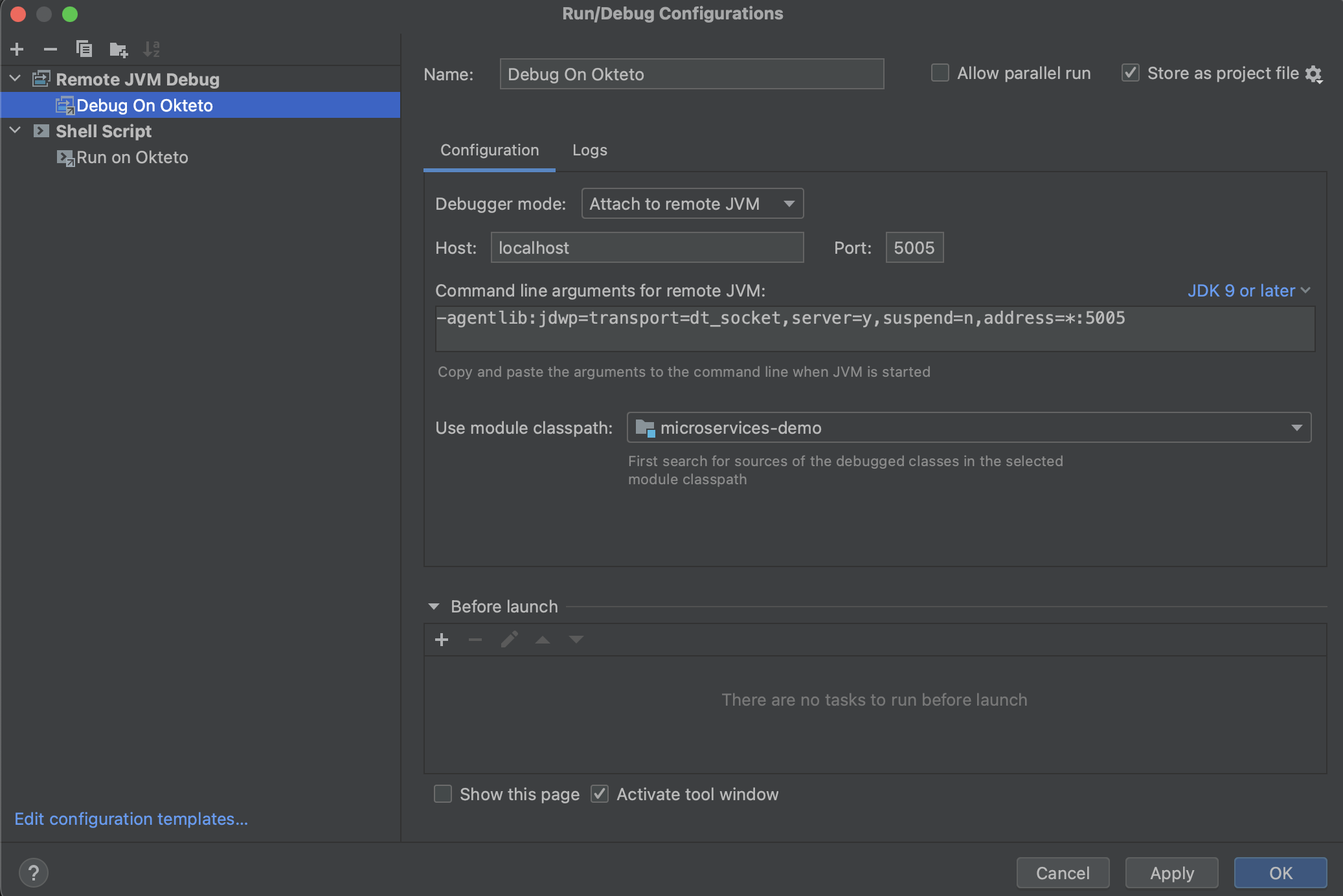
Select the configuration and click Debug. Add a breakpoint on line 11 of src/main/java/com/okteto/helloworld/RestHelloWorld.java and reload the endpoint in your browser. Execution stops at the breakpoint, and you can inspect the stack and the variables of the application running in your cluster.
When you stop the debugging session in IntelliJ IDEA, the debugger detaches from the JVM, and the application keeps running in the Development Container. Press Ctrl+C in the okteto up terminal to stop the application and exit okteto up.
Cleaning up
okteto down stops the Development Container and brings back the hello-world Deployment with the application image:
okteto down
When you're done, okteto destroy uninstalls the Helm release of the Java Sample App from your Namespace:
okteto destroy
FAQ
How do I make builds, deploys, and okteto up faster?
Upload only the files that each command needs: the context upload is key to performance. Every okteto build, okteto deploy, okteto test, and okteto up uploads files from your machine, and three ignore files decide what gets uploaded: .dockerignore for the image builds, .oktetoignore for okteto deploy, okteto test, and okteto destroy, and .stignore for File Sync. An AI agent with the Okteto agent skills configures them for your application and measures how much faster your builds, deploys, and okteto up get. Optimize your Development Environments covers these and other optimizations.
How do I deploy an application with several services and a database?
Follow Deploy Your Application to Okteto if you deploy with a Helm chart, or Develop a Docker Compose application with Okteto if you use Docker Compose. If your services live in several repositories, see Deploy a multi-repo application with dependencies.
Do I need to deploy the whole application in every Namespace?
No. Divert lets you deploy only the services you change and reuse the services of a shared environment.
How do I start each environment with realistic data?
Create its database from a Volume Snapshot instead of running a seed script on every deploy. Data from Volume Snapshots shows how.
How do I create resources outside Kubernetes, such as a cloud database?
Create them in the deploy and destroy commands with your infrastructure as code tool, so every environment gets its own cloud resources. Create cloud infrastructure with Terraform shows how, with an Amazon S3 bucket for each environment.
Where can I find every field of the Okteto Manifest?
The Okteto Manifest reference lists every field of build, deploy, destroy, test, and dev.